PDF, photo, handwriting or Word in. Compiled LaTeX out.
LaTeX Converter
Upload a PDF, a photo, a screenshot, handwritten notes or a Word file, and this LaTeX converter rebuilds it as clean source you can edit. Equations, tables and figures come back in place, and every page is compiled and repaired before you see it.
One credit converts one page
What is a LaTeX converter?
Convert to LaTeX from PDFs, photos and handwriting
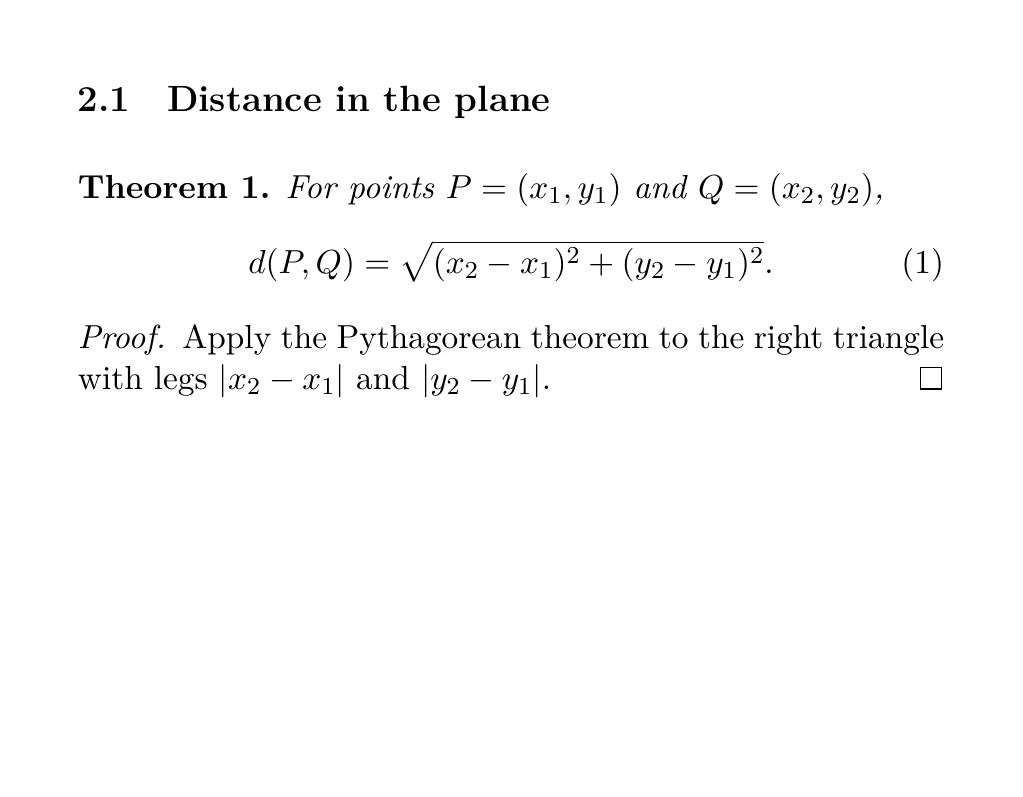
A LaTeX converter reads a document that is not LaTeX and writes the source that would produce it. Here the input can be a PDF, a phone photo of a whiteboard, a screenshot or a page of handwritten notes, and the output is body code with sections, lists, theorems and display math.
PDF to LaTeXA LaTeX converter to Word, HTML and Markdown
Conversion runs the other way too. When a co-author or a journal office asks for a .docx file, the LaTeX to Word tool turns your source into a Word document whose equations stay editable. Separate pages change LaTeX into HTML, Markdown or Typst, and render a single formula as a PNG image.
LaTeX to WordMath to LaTeX: equations and tables
Formulas and tables are where retyping hurts most. Fractions, integrals, matrices, and numbered equations are written with amsmath, and tables come back as tabular code with booktabs rules and multirow cells. One equation from a cropped screenshot and a whole problem sheet go through the same LaTeX converter.
Equation to LaTeXWhy use our LaTeX converter?
LaTeX code that compiles, not a first draft
Our LaTeX converter runs XeLaTeX on every page it writes, reads the real error log when something breaks and sends the page back for repair, so the result you open has already compiled. Characters that cannot be read with certainty are marked [unreadable] in bold instead of being invented.
Open the full converterA free LaTeX converter for quick jobs
Many conversions cost nothing. Spreadsheets become LaTeX tables in your browser, LaTeX to Word is free once you sign in, and the Markdown, HTML and Typst tools need no account. Page conversions from PDFs, photos and Word files use credits, one per page, and pages that fail are refunded.
Browse all free toolsAn online LaTeX converter that keeps figures
Diagrams, plots and photos inside a page are not redrawn by hand. Each figure is cropped out, up to eight per page, referenced from the source where it appeared and bundled in a .zip next to your .tex file.
Image to LaTeXHow to use the LaTeX converter in 3 steps
1. Upload a PDF, image or Word file
Drop a file into the LaTeX converter above or paste a screenshot with Ctrl+V. PDFs show a thumbnail of each page, up to 100, so you pick only the pages you need, while Word files are read in your browser and split into parts. Handwritten notes work best photographed flat in even light.
Handwriting to LaTeX2. Convert, then check the code
Once the LaTeX converter starts, a progress bar counts finished pages. Each result opens with the LaTeX source beside a PDF preview, so you can compare a table or matrix against the original, edit it, and press Compile to see the change before exporting.
Table to LaTeX3. Download .tex, PDF or Word
Export the source as a .tex file, download the compiled PDF, save a Word copy, or grab a .zip with the cropped figures. The LaTeX converter keeps every result in your history, so you can come back, edit and download again. Starting from a .docx? The Word page explains what carries over.
Word to LaTeXLaTeX converter FAQ
- Can I convert LaTeX to Word?
- Yes. Paste your source or upload a .tex file on the LaTeX to Word page and download a .docx. Pandoc does the conversion, so headings, lists, tables and citations come through and equations turn into native Word equations. Only the body is converted: custom macros from the preamble, the title block and images are left out.
- How to convert PDF to LaTeX?
- Upload the PDF to the LaTeX converter at the top, tick the pages you want and start the conversion. Each page is read as an image, written as LaTeX, compiled and repaired. When it finishes you can edit the code, then download a .tex file, the compiled PDF or a Word copy.
- How to convert Word document to LaTeX?
- Upload the .docx file to the LaTeX converter. It is read in your browser, Word equations (OMML) are turned into LaTeX math, heading styles become sections, and long documents are split into parts of 6,000 characters, each charged like a page. Footnotes are not read yet, so copy those across by hand.
- How to convert LaTeX equation to Word?
- Paste the equation on its own, or the whole document, into the LaTeX to Word tool. Inline and display math become editable Word equations. If you need a picture of the formula instead, LaTeX to PNG renders one.
- How to convert LaTeX to PDF?
- A TeX distribution compiles .tex into PDF: run pdflatex or xelatex, or use the build button in TeXstudio, Overleaf or VS Code. Documents converted here are compiled already, so Download PDF hands you the file straight away.
- What is Mathpix?
- Mathpix is a commercial app that recognises math in images and PDFs and exports it as LaTeX, Markdown or Word. styleLatex is a LaTeX converter for the same kind of job: every page it writes is compiled with XeLaTeX and repaired from the real errors before you see it.
- Can Overleaf convert PDF to LaTeX?
- Overleaf is an online editor for writing and compiling LaTeX, not a PDF reader. To start from a PDF, run it through this LaTeX converter first, download the .tex file and the figure .zip, then upload both to a new Overleaf project.
- How to convert Excel table to LaTeX?
- Copy the cells from Excel or Google Sheets and paste them into the Excel to LaTeX tool, or upload a CSV, TSV or .xlsx file. It writes a booktabs table with the first row as the header, all inside your browser. Merged cells are not kept, so check any header that spanned columns.
- How can I convert an image to LaTeX code?
- Upload a PNG, JPG or WebP image, or paste a screenshot into the LaTeX converter with Ctrl+V. Tall images are split into overlapping strips so small print stays readable, and the result is compiled like any other page.
- How to convert LaTeX to Markdown?
- Paste your source into the LaTeX to Markdown tool. Sections become headings, equations stay as math, tables become pipe tables. Markdown to LaTeX and HTML to LaTeX work in the opposite direction, and all three run in the browser.
- Is there a free LaTeX converter?
- Yes, for many formats. Excel to LaTeX and the Markdown, HTML and Typst tools cost nothing and need no account, and LaTeX to Word is free after signing in. Converting PDFs, photos, handwriting and Word files uses credits.
- Does the LaTeX converter use AI?
- Yes. A vision model reads each page and writes the LaTeX, then XeLaTeX compiles it and the model fixes whatever the compiler rejects, for up to two repair rounds. The model is told to transcribe exactly and never to solve, correct or summarise what is on the page.
- How accurate is the converted LaTeX?
- Clean printed pages convert most reliably, while handwriting depends on how neat it is. Because every page the LaTeX converter writes has to compile, broken environments and missing braces are caught automatically. Anything the model cannot read with certainty is marked [unreadable] in bold, so you know exactly where to look.
- How are pages charged?
- One credit per page, or per 6,000-character part of a Word file, and pages that fail are refunded automatically. Free accounts convert up to 5 pages at a time, Starter up to 10 and Pro up to 20. Excel tables and LaTeX to Word use no credits.
- Are my uploaded files stored?
- No. Page images and documents are held in memory only while the job runs and are dropped when it ends. The LaTeX that comes back is saved to your history so you can reopen it, edit it and download it again.
Have a scan, a PDF or a Word file waiting? Turn it into LaTeX that compiles.
Start converting